Private AI Workspace · on your servers or agreed EU hosting
Company knowledge and AI, inside a perimeter you draw.
One workspace to search documents, project notes and technical knowledge, with answers that open their sources. Permissions follow the work, and the models run on your hardware or in agreed EU hosting.
One-off setup · monthly licence · support in English or Romanian
PERIMETER · YOUR SERVERS OR AGREED EU HOSTING0 crossings
workspace · reviewinside perimeter
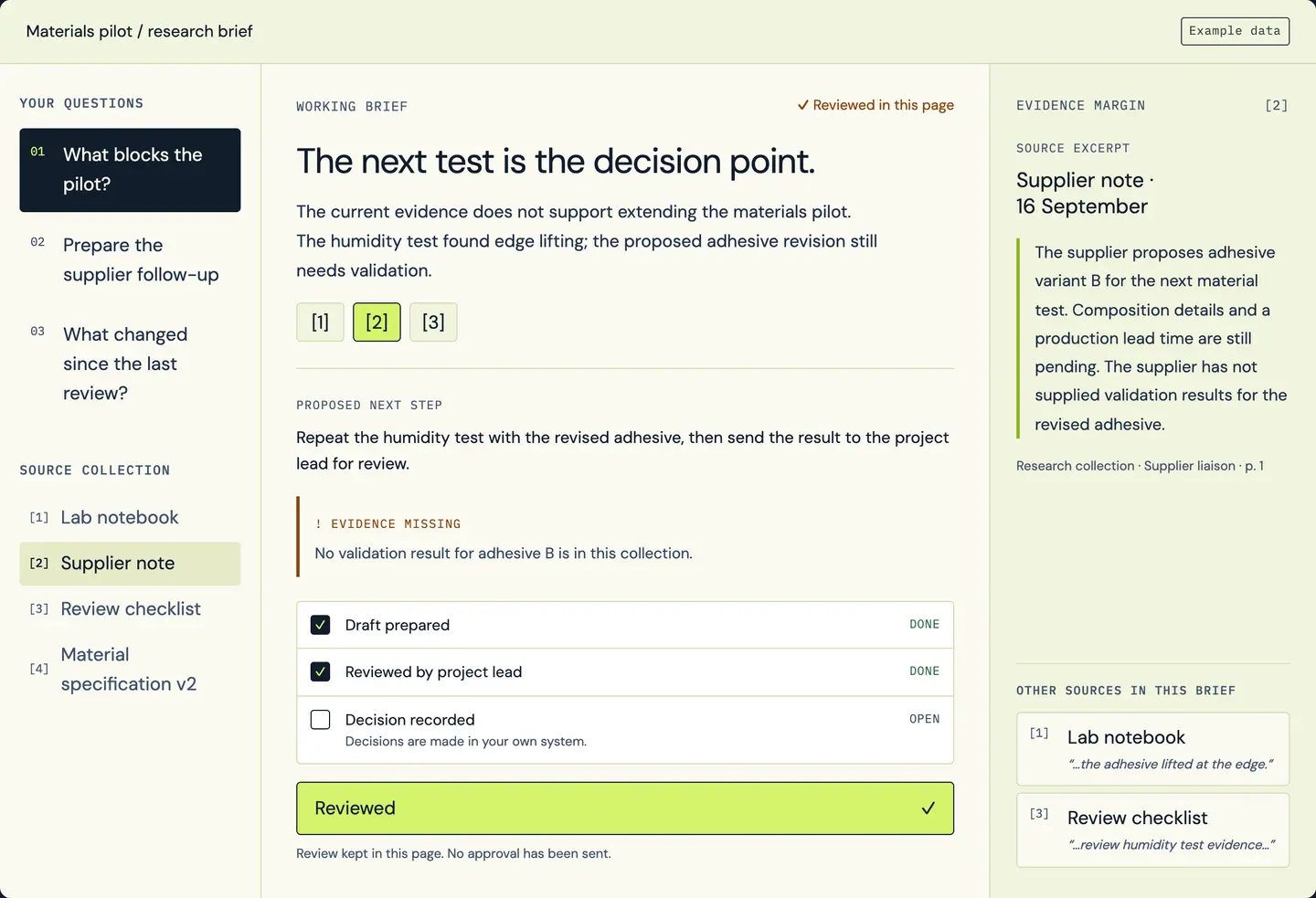
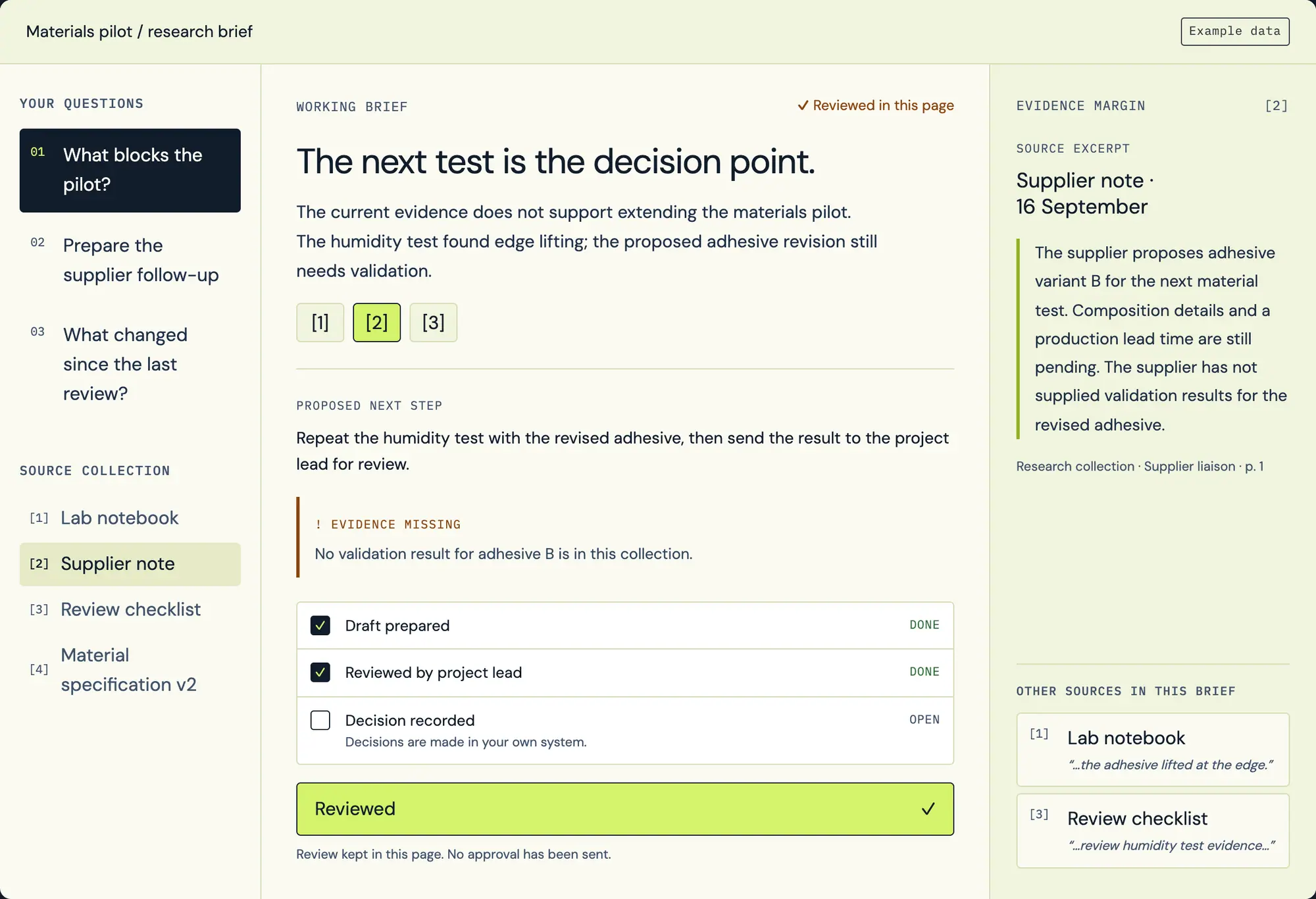
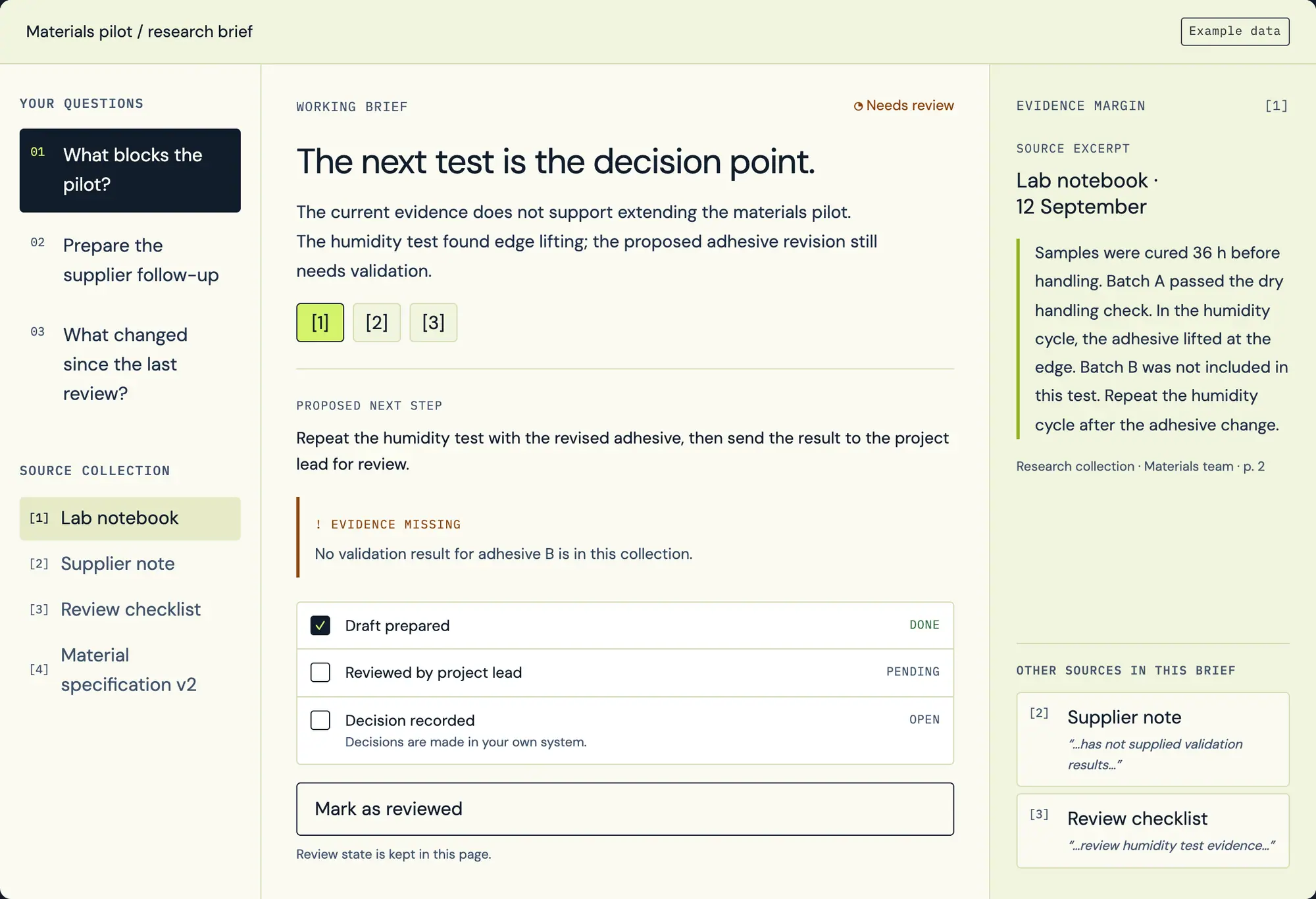
Private AI Workspace: a cited answer with three sources and the evidence still missing (example data).
cited brief
OS/AI-01
Documents stay in your storage
Models on your GPU node
Audit log inside
Example data
DOCUMENTS
Stay in your storage. The index points back to the original.
QUESTIONS
Processed by models running inside the perimeter you approve.
ACCESS
Checked before retrieval, with the groups you already use.
RECORD
Audit log, data-flow record and runbook handed to your team.
01 / Where the data goes
See where a question travels.
The same question, two architectures. Switch between them and follow each hop: who sees the text, where it is processed and where the log ends up.
PERIMETER · YOUR SERVERS OR AGREED EU HOSTING
File shares
PDFs and scans
Tables
U1U1 WORKSPACEweb interface, SSO
U2U2 RETRIEVALpermission filter
U3U3 INDEXkeyword, semantic, graph
U4U4 MODEL SERVINGGPU node
U5U5 MONITORINGaudit log
U6U6 BACKUPencrypted, inside the perimeter
ANSWER
Rev. 7 of PR-QA-014 applies from 1 Nov. Rev. 6 stays in force until then.
Written by the provider’s model, outside the perimeter.
PR-QA-014 · rev. 7 · p. 2rev. 6 · p. 2
Audit log · insidePrompt log · at the provider
Example data
0 crossings in this exampleup to 3 crossings, set by the provider’s terms
no route
1question + passages
2uploaded files, if used
3prompts and answers
External AI services
Outside the perimeter. No route from your documents.
Receives the question and passages; location and retention follow the provider’s terms.
Reference layout for an on-site deployment, simplified. In a dedicated EU environment, the perimeter is that environment and the proposal names who runs it. Public services differ; check each provider’s terms.
Employee types a question in the browser.
Inside
Files are uploaded to the provider’s workspace, if the assistant uses one.
Leaves the perimeter, if used
The question and any attached passages go to the provider’s model.
Leaves the perimeter
Prompts and answers are logged wherever the provider’s terms say logs are kept.
Set by the provider’s terms
Your folder permissions apply where the provider’s connector carries them over.
Depends on the connector
Employee asks in the workspace and signs in with the account they already have.
Inside
The permission filter resolves their groups and limits the searchable sources.
Inside
The index returns passages only from documents they may read.
Inside
A model on your GPU node or in agreed EU hosting writes the answer.
Inside
The answer links each claim to the page or passage it came from.
Inside
The request is written to your audit log, kept under your retention policy.
Inside
Simplified comparison. Public services differ; check each provider’s terms for data use, location and retention.
02 / Where it runs
Three ways to run it. One data promise.
The hosting choice follows the material, the workload and who will operate the service. If a route fails, restricted documents wait. They are never quietly sent elsewhere.
D1
On your servers
Models, index and workspace run on hardware in your building or your data centre. Your team or ours operates it under a written runbook.
Fits when
Restricted project material
Existing server room
In-house IT
D2
Agreed EU hosting
A dedicated environment in the EU. We run it and hosting is part of the licence, or it runs with an EU operator you contract directly. Either way, the proposal names who can see what: the operator, the support team and any backup location.
Fits when
No GPU hardware on site
Several offices
Managed operation preferred
D3
Hybrid, split by data class
Restricted material stays local; public or low-risk material can use an approved external service. Each class has its own route, written down and enforced in configuration.
Fits when
Mixed workloads
Long public reports
Tight hardware budget
DATA-CLASS ROUTINGExample data
Example classification
Class
Example
Route
Who may see logs
Public
Product datasheets
Any approved route
Workspace admins
Internal
Work procedures
On site or agreed EU hosting
Workspace admins
Confidential
Customer contracts
On site only
Named support engineers
Excluded
Employee records
Not indexed in phase one
—
03 / The stack
Six layers, each one you can inspect.
Running a model on your own server is the start. The work is in the layers around it: which version of a document is current, who may read it and what the reader can check.
Architecture example. Components are chosen for each project.
01Workspacebrowser · SSO
Search, cited answers, source viewer and a review queue, in the browser. Sign-in uses the identity your company already runs.
02Permission-aware retrievalfilter before generation
Access rules are applied before passages reach the model, not by hiding links afterwards. Revoking access is treated as an event that reaches the index.
03Indexkeyword · semantic · graph
Keyword, semantic and relationship search, chosen per task. Each passage keeps its document, version, page and permissions.
04IngestionPDF · tables · images · web
Documents, tables, images and web pages, with text and image extraction. Revisions of one document stay linked as a family.
05Model servingGPU node · per-task models
Models selected after testing on your own questions, sized for the number of people working at the same time, including background indexing.
06Operationsmonitoring · backup · runbook
Monitoring, audit log, backups and restore tests, with a documented handover and a runbook your team can follow.
04 / One question, traced
One question, every step on the record.
This is what the audit log keeps for a single request. Your security team can read it without asking us.
05answerboth revisions shown with dates; owner: Quality manager✓done
06logwritten · retention per policy✓done
LEFT THE PERIMETERnothing
01
Exclusions are logged, so you can prove a restricted source was not used.
02
When two versions disagree, both are shown and the procedure owner decides.
03
When the evidence is missing, the answer says so.
05 / Models and workloads
Models sized to your work, not the other way round.
Search, long-report summaries and scanned-page extraction put very different loads on memory and processing. We test candidate models on a checked set of your own questions before anything is bought.
SEARCH
Ask the documents
Short answers with the passage and page attached.
Typical route: Local model
SUMMARY
Brief a long report
Reviewed briefs that keep a reference for every statement.
Typical route: Local or approved route
EXTRACT
Read tables and scans
Values pulled from tables, drawings and scanned pages, linked back.
Typical route: Smaller local model
COMPARE
Compare versions
Current, future and historical revisions shown side by side.
Typical route: Local model
How we choose
01Same checked workload for every candidate.
02Measured on waiting time, throughput and answer quality together.
03Tested with the number of people likely to use it at once, with indexing running.
04A smaller model can serve a narrow task; a different route can serve long reasoning.
On your servers or in a dedicated EU environment, we run models that work entirely on that hardware. External model APIs are used only for the data classes you approve.
06 / Inside the rack
Who can touch what, layer by layer.
Documents, models, servers and the people who run them each get their own rules. Pick one to see what is fixed in configuration and what is written down.
Documents stay in their repository; the index stores references, versions and permissions.
Names and identifiers can be masked before text reaches a model.
Deletion reaches the index, caches and stored answers.
Each model is approved per data class and recorded in the data-flow record.
Answers cite sources; contradictions are shown, not blended.
Model changes are tested on the same checked workload before release.
Users reach the workspace only; model serving and the index answer requests from the retrieval layer.
Capacity is sized for people working at the same time, with background indexing running.
Backups stay in the location written in the proposal, and restores are tested.
Single sign-on and roles from the identity provider you already use.
Administrator and support access reviewed separately, with a written procedure and retention.
Audit log of every request, including what was excluded.
EU hosting alone does not establish compliance. We give your legal and security colleagues an accurate description of the processing; legal interpretation stays with them.
07 / What your team uses
What your team actually opens.
Behind the infrastructure is a calm workspace: ask, read the cited passage, flag what needs review.
INSIDE YOUR PERIMETER · WORKSPACE SCREENS
Example data
workspace · questions
OS/PAI-02
workspace · cited brief
OS/PAI-03
workspace · review
OS/PAI-04
workspace · questions
01 / Ask
Ask in plain words, inside the perimeter.
Questions sit next to the source collection they are allowed to search. The brief opens with what the evidence supports and what it does not.
workspace · cited brief
02 / Check
Every claim points at its passage.
Each statement carries a numbered citation: document, date and the quoted line. Missing evidence is flagged instead of guessed.
workspace · review
03 / Review
Mark it reviewed. Decide in your own system.
The reviewer ticks the checklist against the evidence margin. The review is recorded; the decision itself stays in your own system.
These are the cited-answer workspace screens, shared with AI Copilot, our hosted version. In a private deployment the same interface runs on your servers or in agreed EU hosting, signed in with your own accounts.
Built for private deployments
workspace · versions
PR-QA-014 · Incoming inspectionExample data
Two versions found
rev. 6 · effective now
Visual check on arrival
Sample size: 5 per batch
Record in quality log
rev. 7 · effective 1 Nov
Visual check on arrival
Sample size: 8 per batch
Record in quality log
ANSWER
Both revisions apply, on different dates: 5 per batch until rev. 7 takes effect, 8 per batch from 1 Nov.
rev. 6 · p. 2rev. 7 · p. 2
Owner decision pendingRouted to: Quality manager
Mockup: two revisions of the same procedure shown side by side, with the differing line highlighted.
workspace · access tests
ACCESS TEST MATRIXExample data
Access tests by test identity
Test identity
Procedures
Contracts
HR
test.engineering
✓ Allowed
⊘ Denied
⊘ Denied
test.quality
✓ Allowed
✓ Allowed
⊘ Denied
test.guest
⊘ Denied
⊘ Denied
⊘ Denied
EVENT · access revoked
contracts-readers removed from test.engineering → index updated → matrix re-run
last run after access change · all expected
Every permission rule has a test identity that must and must not see it.
The first delivery connects one repository and one identity system, with tests. Further connectors are estimated from their permission models.
09 / Compared
Three ways to get AI on company documents.
Qualitative comparison of three approaches
Criterion
Public AI assistant
Built in-house
RDCopilot Private AI Workspace
Where documents are processed
Provider’s infrastructure
Wherever you build it
Your servers or agreed EU hosting
Document permissions
Depends on connector
You design and test them
Applied before retrieval, tested per identity
Model choice
Provider’s models
Any, you operate it
Chosen per task after tests on your questions
Conflicting versions
Depends on the product
You build the logic
Shown side by side, sent to the owner
Cost model
Per user or per usage
Team time and hardware
One-off setup + monthly licence (EU hosting included when we host); your own hardware or third-party hosting on a separate line
Operations and support
Provider’s support channels
Your team
Runbook, monitoring, support in English or Romanian
General comparison. Individual services and in-house projects vary.
10 / From pilot to handover
Start with one team and one difficult question.
01
Choose the task
One team, one recurring question, one document family that causes trouble today.
02
Agree document access
Classify the material, map groups to repositories and write the permission matrix.
03
Assess models and hosting
Test candidate models on your checked questions; compare on-site, EU hosting and split routes.
04
Build the pilot
One repository, one identity system, the workspace, the audit log and access tests.
05
Review against sources
Your experts check answers against the originals; gaps and conflicts go to their owners.
06
Deploy and hand over
Production deployment, monitoring, backups, restore test and a documented handover.
The complete workspace and its integrations are scoped engineering work, quoted after step 03.
What stays yours, whatever happens.
On your servers, documents never enter our systems. In a dedicated EU environment, the proposal names where each component runs and who can access it. The index, configuration and logs are exported on request, in formats agreed in the handover. If you stop the licence while we host, we return or delete your data, at your choice, unless the law requires us to keep it, and you keep the handover record.
MANIFEST · handover06
Data-flow record: every component, location and who can see what, ready for your record of processing activities
Permission matrix and access tests
Model evaluation on your checked questions
Deployment documentation and runbook
Audit log and configuration export
Backup and restore procedure
11 / How it is priced
Priced in clear lines.
Setup and licence are separate lines, so the build cost is never hidden inside an operating fee. Your own hardware or third-party hosting is quoted on its own.
PROPOSAL OUTLINEExample data
01Readiness and model evaluationquoted
02Setup and implementation · one-offquoted
03Hardware or third-party hosting · if applicablequoted
04Monthly licenceupdates · monitoring · support RO/ENEU hosting and backups, when we hostquoted
05Extra work · fixed hourly rateon approved estimate
Setup covers ingestion, retrieval, access integration, the workspace and training for the people who will use it, which also supports AI literacy under the AI Act.
The licence covers updates, monitoring and help-desk support in English or Romanian. When we host in a dedicated EU environment, hosting and backups are included too.
Hardware you buy is yours. We help size it before you order.
It depends on the route you approve, and the answer is written down. In an on-site deployment, documents, questions, model processing, logs and backups stay inside your network. With agreed EU hosting, they stay in that dedicated environment, and the proposal names the operator and who can access it. External services are used only for the data classes you approve.
02What hardware do we need?
We size it after testing your own questions with the number of people likely to use the workspace at once, including background indexing. If buying hardware does not make sense yet, agreed EU hosting lets you start without it. Hardware is quoted as its own line.
03Which models do you use?
Models chosen per task after testing on your checked workload. For on-site and dedicated EU deployments, these are models that run entirely on that hardware. External APIs are used only for the data classes you approve. A smaller model can handle extraction while another serves longer reasoning, and each approved model is recorded in the data-flow record.
04How do document permissions carry over?
The workspace uses the identity provider and groups you already run. Access rules filter passages before the model sees them, and an access change is pushed to the index. We test it with named test identities that must and must not see each document.
05What happens when two documents disagree?
The answer shows both, with their version and effective date, instead of blending them. Unresolved conflicts go to the person who owns the procedure. When there is no evidence, the workspace says so.
06Can it run air-gapped, with no internet connection?
Yes, where the readiness session confirms it. We plan how models, updates and support access reach an isolated network, and the procedure goes into the runbook before the build starts.
07Who runs it after launch?
Either your team, following the runbook we hand over, or we operate it under the monthly licence, which covers updates, monitoring and support in Romanian or English. Support access follows a written procedure you approve.
08How do we start, and how is it priced?
With a readiness session about one team, one task and your hosting constraints. We then propose an evaluation and a pilot. Pricing has a one-off setup and a monthly licence that covers updates, monitoring and support, plus EU hosting when we host. Your own hardware or third-party hosting, and any extra work, are quoted on separate lines.
13 / Next step
Draw the perimeter first. Then we build inside it.
Bring one team, one difficult document family and your hosting constraints. We will come back with a data-flow sketch and a pilot proposal.